Cyber Kill Chain
The Cyber Kill Chain framework is designed for identification and prevention of the network intrusions. You will learn what the adversaries need to do in order to achieve their goals.
Task 1 Introduction
Task 1 introduces the Cyber Kill Chain® framework developed by Lockheed Martin in 2011, adapting the military kill chain concept to cybersecurity. It outlines the seven attack phases adversaries typically follow and emphasizes its value in detecting and disrupting threats like ransomware and APTs. The task highlights the importance for security roles and previews that later sections will cover each phase plus the model’s pros and cons. The goal is to enable readers to recognize attack stages and break the chain.
Task 2 Reconnaissance
Task 2 covers the Reconnaissance phase, the initial research stage of the Cyber Kill Chain where adversaries gather target intelligence passively (and sometimes actively) to plan attacks. It emphasizes OSINT as a key technique, sourcing data from search engines, social media, WHOIS, public records, and more. The task differentiates passive (no interaction, e.g., social media scraping) vs. active recon (direct probing, e.g., scanning). Through the example of attacker “Megatron,” it highlights email harvesting for phishing and introduces tools like theHarvester (multi-source enumerator for emails/subdomains), Hunter.io (domain/email finder), and the OSINT Framework (tool directory). Understanding recon helps defenders detect early signs and disrupt attacks before they advance.
Q1: What is the name of the Intel Gathering Tool that is a web-based interface to the common tools and resources for open-source intelligence?
Answer: OSINT Framework
The OSINT (Open-Source Intelligence) framework is a structured methodology for gathering, organizing, and analyzing publicly available information to generate actionable insights. It leverages diverse sources such as search engines, social media, public records, technical data, and even the dark web to assess risks, identify vulnerabilities, and support decision-making.
Q2: What is the definition for the email gathering process during the stage of reconnaissance?
Answer: email harvesting
As mentioned in the task explanation: Email harvesting is the process of obtaining email addresses from public, paid, or free services. An attacker can use email-address harvesting for a phishing attack (a type of social-engineering attack used to steal sensitive data, including login credentials and credit card numbers). The attacker will have a big arsenal of tools available for reconnaissance purposes. Here are some of them:
Task 3 Weaponization
Task 3 examines the Weaponization phase, where attackers convert reconnaissance findings into deployable cyber weapons. After gathering target details, adversaries craft or acquire payloads by combining exploits (vulnerability abuses) with malware (e.g., ransomware, backdoors). The task defines key terms: malware, exploit, payload and notes that less skilled attackers buy pre-made tools from the Dark Web, while sophisticated ones (e.g., APTs) build custom ones for evasion. Continuing the “Megatron” scenario, he purchases a ready payload. Common tactics include malicious Office macros/VBA, infected USB worms, pre-staged C2 servers, backdoors, and convincing phishing/OAuth lures. This offline preparation phase bridges intel gathering to delivery, highlighting why early detection of emerging tools via threat intel is vital to breaking the chain before exploitation.
Q1: What is the term for automated scripts embedded in Microsoft Office documents that can be used to perform tasks or exploited by attackers for malicious purposes?
Answer: Macro
As mentioned in the task explanation, one of the tactics hackers can adopt is: Create an infected Microsoft Office document containing a malicious macros or VBA (Visual Basic for Applications) scripts.
Macros are automated scripts used in software applications that can enhance productivity but also pose significant cybersecurity risks if exploited by malicious actors.
Task 4 Delivery
Task 4 details the Delivery phase, where the attacker transmits the weaponized payload into the victim’s environment after reconnaissance and weaponization. The task outlines three primary methods: phishing emails (spear or mass campaigns with malicious links/attachments), USB drop attacks (physical distribution of infected drives, sometimes branded to appear legitimate), and watering hole attacks (compromising trusted websites frequented by targets to serve drive-by downloads or fake extension prompts). Continuing the “Megatron” scenario, this phase marks the shift to active compromise attempts. Understanding delivery vectors is critical for defenders, as it is often the first observable stage, enabling prevention through email filtering, user awareness training, endpoint controls, and web security measures to stop the payload before exploitation can occur.
Q1: What do you call an attack targeting a specific group by infecting their frequently visited website?
Answer: Watering hole attack
As Mentioned: Watering hole attacks are targeted and designed to aim at a specific group of people by compromising the website they are usually visiting, redirecting them to a malicious website of the attacker’s choice or creation. Victims would unintentionally download malware or a malicious application to their computer, resulting in a drive-by download. An example can be a malicious pop-up asking to download a fake Browser extension.
Task 5 Exploitation
Task 5 explores the Exploitation phase, where the delivered payload activates by exploiting a vulnerability, allowing the attacker’s code to execute on the target system. In the “Megatron” scenario, techniques include malicious macro execution (e.g., ransomware via phishing-enabled Office macros), zero-day exploits (unknown flaws with no patches), and known CVEs (unpatched public vulnerabilities). Once access is gained, attackers escalate privileges or move laterally. The task lists detectable signs such as unexpected processes, registry/service changes, and suspicious command-line activity in logs. This phase marks the transition from potential to active compromise, underscoring the importance of defenses like patching, macro restrictions, exploit prevention, and behavioral monitoring to detect and halt attacks before persistence or further objectives are achieved.
Q1: What is the term for a cyber attack that exploits a software vulnerability that is unknown by software vendors?
Answer: Zero-day
Per IBM “A zero-day exploit is a cyberattack vector that takes advantage of an unknown or unaddressed security flaw in computer software, hardware or firmware. “Zero day” refers to the fact that the software or device vendor has zero days to fix the flaw because malicious actors can already use it to access vulnerable systems.”
Task 6 Installation
Task 6 examines the Installation phase, where attackers establish persistence after exploitation to maintain long-term access via backdoors or access points. The task explains the need for persistence (to survive reboots, patches, or detection) and details techniques: installing web shells on servers (hard-to-detect scripts in PHP/ASP/JSP), deploying backdoors like Meterpreter, creating/modifying Windows services (MITRE T1543.003 using sc.exe/Reg for autostart under SYSTEM), and adding to Registry Run Keys or Startup Folders (MITRE T1547.001 for login execution). It also covers timestomping to alter file timestamps and evade forensics. References include the Windows Persistence Room on TryHackMe and Microsoft resources on web shells. This phase shifts focus to defense via persistence monitoring, registry auditing, service enumeration, and behavioral detection to remove footholds before Command & Control or objectives are fully achieved.
Q1: What technique is used to modify file time attributes to hide new or changes to existing files?
Answer: Timestomping
As mentioned: the attacker can also use the Timestomping technique to avoid detection by the forensic investigator and also to make the malware appear as a part of a legitimate program. The timestomping technique lets an attacker modify the file’s timestamps, including to modify, access, create and change times.
Q2: What malicious script can be planted by an attacker on the web server to maintain access to the compromised system and enables the web server to be accessed remotely?
Answer: Web shell
Task 7 Command & Control
Task 7 details the Command & Control (C2) phase, where persistent malware on the compromised system establishes a remote communication channel (C2 beaconing) to the attacker’s infrastructure. This allows full remote control, command issuance, data exfiltration, and further payload delivery. The task explains beaconing as periodic, low-profile contact and notes the shift away from outdated IRC channels (now easily detected) toward stealthier modern methods. The primary channels highlighted are HTTP/HTTPS on ports 80/443 (blending with legitimate web traffic to evade firewalls) and DNS tunneling (encoding data in DNS queries for stealthy communication). C2 servers may be attacker-owned or leverage other compromised hosts. This phase is critical for defenders to detect via network monitoring, beaconing patterns, DNS analysis, and endpoint behavioral indicators, enabling disruption of attacker control before final objectives are reached.
Q1: What is the C2 communication where the victim makes regular DNS requests to a DNS server and domain which belong to an attacker.
Answer: DNS Tunneling
DNS tunneling is a technique where attackers hide non-DNS data inside DNS queries and responses to bypass security controls. Since DNS is critical for internet functionality and often allowed through firewalls without inspection, it becomes an attractive covert channel for command-and-control (C2), data exfiltration, and malware delivery.
Task 8 Actions on Objectives (Exfiltration)
Task 8 concludes the Cyber Kill Chain with the Actions on Objectives phase (emphasizing exfiltration), where the attacker finally achieves their intended goal after completing the previous six phases. With full control via C2 and persistence, “Megatron” can perform actions such as credential collection, privilege escalation (e.g., to domain admin), internal reconnaissance, lateral movement across the network, sensitive data collection and exfiltration, deletion of backups and Volume Shadow Copies (to hinder recovery), and overwriting or corrupting data. This phase represents the culmination of the attack. the point where real harm (theft, disruption, extortion) occurs. Defenders focus here on behavioral detection, DLP, egress filtering, robust offline backups, and rapid incident response to minimize impact and contain the breach once objectives are in motion.
Q1: What technology is included in Microsoft Windows that can create backup copies or snapshots of files or volumes on the computer, even when they are in use?
Answer: Shadow Copy
Task 9 Practice Analysis
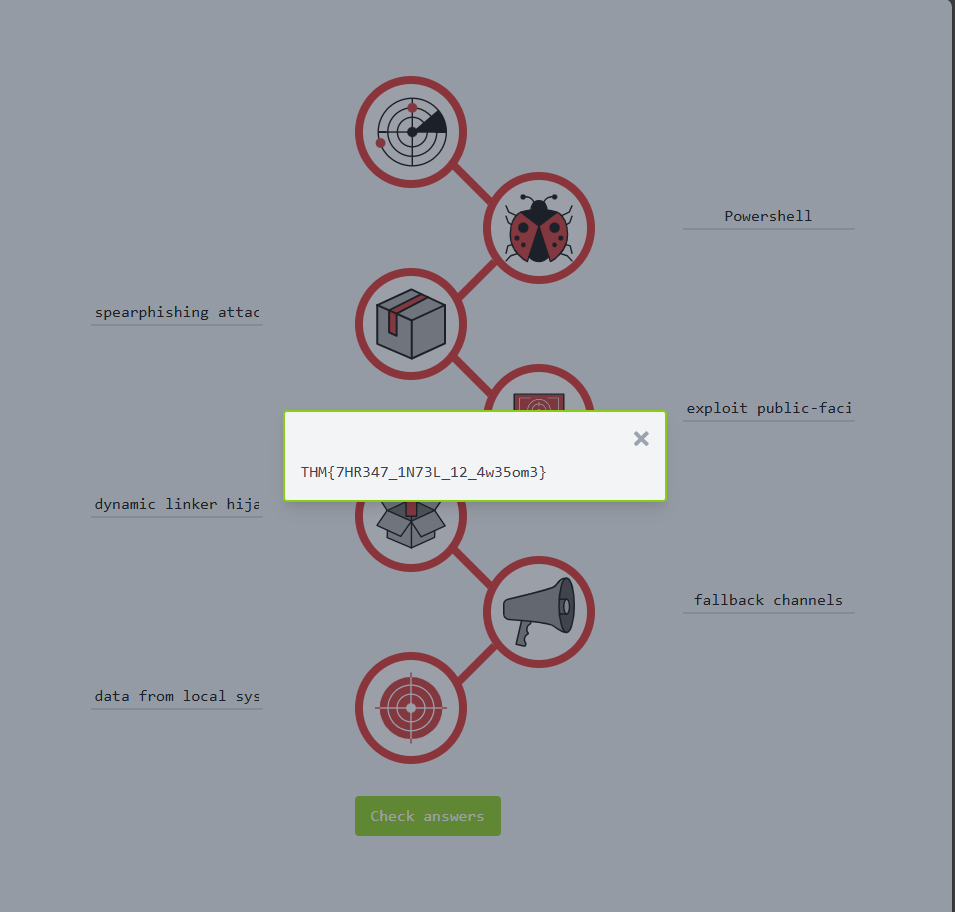
1. Add each item on the list in the correct Kill Chain entry-form on the Static Site Lab:
- exploit public-facing application
- data from local system
- powershell
- dynamic linker hijacking
- spearphishing attachment
- fallback channels
2. Use the ‘Check answers’ button to verify whether the answers are correct (where wrong answers will be underlined in red).
Q1: What is the flag after you complete the static site?
Answer: THM{7HR347_1N73L_12_4w35om3}
- In the Weaponization phase, we can use Powershell
- in the Delivery phase, it can be done using spearphishing attachment
- in the Exploitation phase, it can be done using exploit public-facing application
- in the Installation phase, it can be done using dynamic linker hijacking
- in the C2 phase, it can be done by using fallback channels
- in the Objectives (Exfiltration) phase, data from local system
I hope this writeup has helped you better understand the Cyber Kill Chain and how to break it in real-world scenarios. Thanks for reading!😊