AntiVirus Alerts Investigation
AntiVirus Alerts Investigation
Overview of AV Alerts Investigation
When an AV system detects a potential threat, it generates logs with specific fields that help investigators triage, analyze, and respond. These logs are crucial for understanding the scope of an infection, as they capture details about the affected system, the malware itself, and the AV’s response. Investigation typically involves:
- Triage: Assess severity based on the affected asset and malware type.
- Analysis: Research the malware using tools like VirusTotal (for hash lookups) or sandboxes (e.g., Any.Run for behavioral observation).
- Response: Isolate the device, remediate (e.g., quarantine), and document for forensics.
- Best Practice Tip: Always start by isolating the infected machine to prevent lateral movement, as recommended in malware incident response playbooks. Logs from popular AV solutions (e.g., Microsoft Defender, Trend Micro) often follow formats like CEF (Common Event Format), which standardize fields for easier parsing in SIEM tools.
Key Fields in AV Logs
| Field Name | Description | Investigation Tips & Additional Info |
|---|---|---|
| Infected Machine (also called Endpoint or Device Host) | Identifies the affected system, such as a client workstation, server, or mobile device. Severity is assigned based on the machine's criticality (e.g., low for a standard client, high for a CEO's laptop or production server). Includes details like hostname, IP address, and associated user. | Prioritize based on business impact: A CEO machine warrants immediate C-level notification and isolation. Check related logs for network connections to detect lateral spread. In Microsoft Defender, view this in the "Devices list" under incidents and alerts. Best practice: Assign severity levels (e.g., Critical/High/Medium/Low) using frameworks like CVSS for assets. |
| Malware Category / Type | Categorizes the threat (e.g., ransomware like Maze, trojan, worm, spyware). Often tied to detection signatures or behaviors. | Use this to gauge risk—ransomware can encrypt files organization-wide. Cross-reference with threat intelligence feeds. Common categories include viruses, adware, and exploits; logs may include a "Protection Type" or "Reason" field for sub-details (e.g., "scan detection"). |
| Malware Hash | A unique cryptographic identifier (e.g., SHA-1, SHA-256, MD5) of the malicious file or sample. Used to match known threats. | Search the hash on VirusTotal for detection ratios, behaviors, and IOCs (Indicators of Compromise). If no matches, upload a safe sample to a sandbox like Any.Run to observe runtime behavior (e.g., file encryption for ransomware). Hashes enable tracking variants across incidents. |
| Malware Name | The specific name or signature assigned by the AV vendor to the detected threat. | Search online (e.g., via Google or MITRE ATT&CK) for details on tactics, techniques, and procedures (TTPs). For Maze, it's a discontinued ransomware known for double extortion (data theft + encryption); research shows it targeted enterprises via RDP exploits. Logs may include a "Detections" count for multiples. |
| Path (also called File Path or Infection Source) | The location or vector of infection on the machine (e.g., file path where malware was found) or the entry point (e.g., USB drive, email attachment, network share). | Trace the path to identify the initial vector—e.g., if from USB, review access logs for physical security breaches. In logs, this helps in forensics; use tools like Process Explorer to verify if the path is still active. Best practice: Block common paths (e.g., temp folders) via AV policies. |
| Device Action (also called Primary/Secondary Action or AV Response) | Describes the AV's response to the detection, such as quarantine, deletion, rename, or block. May include results (e.g., success/failure) and secondary actions if the first fails. | Evaluate if the action was effective—e.g., if quarantine failed, manually isolate. Common actions include real-time scan blocks or manual cleanups. In investigation, check for "Action Result" fields to confirm remediation; if incomplete, escalate to full wipe/reimage. Best practice: Automate alerts for failed actions in your SIEM. |
| Additional Common Fields | - Timestamp (rt): When the detection occurred (UTC). - Severity Code: Numeric risk level (e.g., 0=Low, 3=High). - Scan Type (cs1): How it was detected (e.g., real-time, manual). - File Name (fname): Name of the infected file. | These provide context for timelines and false positive checks. Always correlate with system event logs (e.g., Windows Event Viewer) for full picture. |
Expanded Investigation Steps
here’s how to investigate using the above fields:
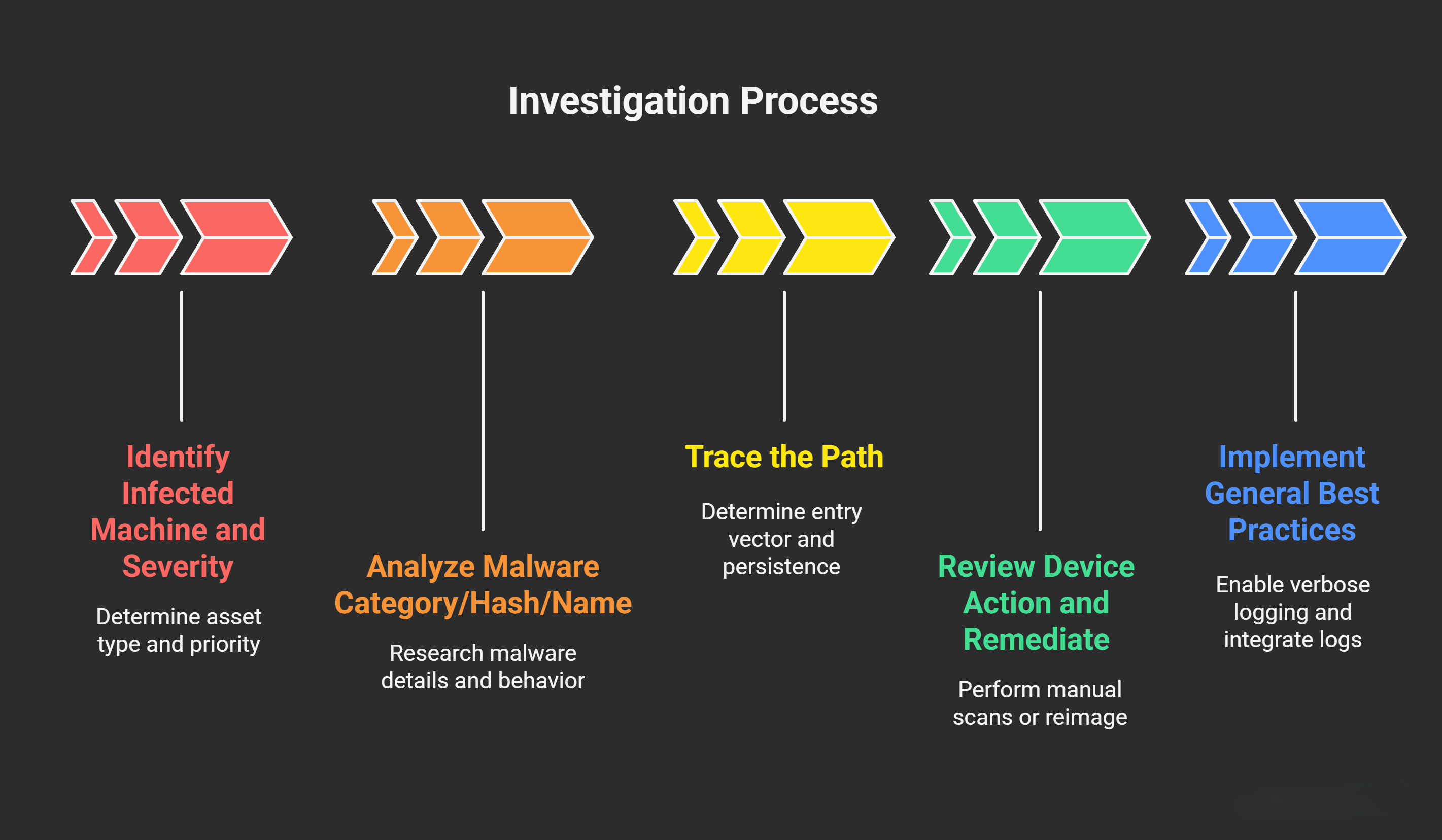
- Start with Infected Machine and Severity: Identify the asset type (client/server) and assign priority. For high-severity cases (e.g., CEO machine), notify stakeholders immediately and isolate via network segmentation. Use AV consoles (e.g., Microsoft Defender Alerts queue) to filter by device.
- Analyze Malware Category/Hash/Name: Combine these for deep research. For a ransomware hash, query VirusTotal for AV vendor detections (e.g., 50/70 engines flag it) and relations (e.g., C2 servers). If needed, detonate in Any.Run sandbox to simulate behavior like file encryption or persistence mechanisms. This reveals if it’s a known family (e.g., Maze targets via phishing). Tip: Use multiple sources to avoid false positives—e.g., check Hybrid Analysis for behavioral reports.
- Trace the Path: Determine entry vector (e.g., USB implies insider threat). Review file paths for persistence (e.g., in %AppData%). Correlate with email/network logs to block future vectors.
- Review Device Action and Remediate: If the AV action was incomplete, perform manual scans or reimage. Document outcomes for compliance. Post-remediation, monitor for reinfection using EDR tools.
- General Best Practices:
- Enable verbose logging in AV (e.g., Windows Defender with -v flag) for detailed traces.
- Integrate AV logs into a SIEM for alerting on patterns (e.g., multiple detections).
- After resolution, update signatures and conduct a root cause analysis to prevent recurrence, per NIST guidelines.
This post is licensed under CC BY 4.0 by the author.